Friday, December 5, 2008

Samsung Claiming Thinnest LCD Screen at 7.9mm


Need another 1/10th of a millimeter of space on your desk? Probably not, but Samsung is claiming the thinnest LCD in the world at 7.9mm over the 8.0mm Phillips had on show back in August. A tenth of a millimeter is not much at all, but when it comes to these giants competing with each other, it means everything. Samsung unveiled a prototype 40-inch LCD that is 7.9mm thin at an event in South Korea last week — beating the 32-inch LCD from Phillips at 8mm..

Both prototypes were able to achieve their ’thinness’ by having the tuner and most other electronics put into a separate box that sits near the screen. There has been no mention of either product becoming commercially available at this point in time.

Samsung was also showing off a 52-inch LCD that is only 9.9mm thin — which is very impressive and matches the Sony ZX1, due to ship this coming November in Japan and Europe to follow shortly after. Samsung has no comment on when its super thin 52-inch is expected to hit the market.

It is quite amazing how thin these things are getting — it seems like only yesterday we were all using enormous CRTs on our desks and living rooms.


by Aaron Heibert
Source: Tom's Hardware

Stereoscopic Glasses from Nvidia


Some of you might remember way back in the day when you could get the 3D VR glasses, like the ones packaged with a TNT2 Ultra from ASUS. They were pretty neat for their time, but by no means very good. They were troublesome to get working properly and game support was pretty flaky as well. Hence why they pretty much disappeared from the market shortly after. Good try right?

Well Nvidia is bringing this whole idea back this year, hopefully with a much better experience for the user. Quoting and interview that Maximum PC recently had with Nvidia, we have the following direct response:

“The Nvidia GeForce Stereoscopic 3D driver works at the lowest level by taking 3D game data and rendering each scene twice – once for the left eye and once for the right eye. Each eye image is offset from each other for the correct viewing. The GPU then sends this data to a 3D Ready display. These displays show the left eye view for even frames (0,2,4,etc) and the right eye view for odd frames (1,3,5,etc). Nvidia 3D glasses then synchronize back to the 3D Ready display and present slightly different images to each eye resulting in the illusion of depth and an incredibly immersive experience for games.”

This new stereoscopic technology will be better experienced on displays with fast refresh rates (120Hz). So do not expect to get a really good experience from an out-dated display. Display factor aside, Andrew Fear – the product manager for the new technology, says you will need at least a GeForce 8800GT or better, a 32bit copy of Windows Vista (64bit support coming later) and of course a pair of Nvidia’s own stereoscopic 3D glasses.

Nvidia claims to have implemented a support library of over 350 existing DirectX 8,9 and 10 titles so far. However OpenGL games such as Quake 4 and Prey are not supported as of yet.

The glasses themselves should be shipping by the end of this year according to Andrew Fear. They’ll work wirelessly with a USB infrared transmitter and the built-in batteries should retain enough power for roughly 40 hours between charging. It sounds as though the glasses will use some type of built in shutter mechanism to shield each eye from even or odd frames.


by Aaron Heibert
Source: Tom's Hardware

Zotac Releases Tiny WiFi Motherboard


For times when even micro-ATX motherboards are just too big, Zotac’s newly released mini-ITX motherboard could come in handy, featuring Nvidia’s Geforce 8200 mGPU and built-in WiFi. The new Zotac Geforce 8200-ITX WiFi motherboard looks like a decent choice for anyone planning to build a tiny media center PC, although serious gamers will look elsewhere. The main highlight of the motherboard is that it measures just 6.7-inch by 6.7-inch in size, considerably smaller than the 9.6-inch by 9.6-inch dimensions of many micro-ATX motherboards.

One of the highlights of the motherboard is the integrated Geforce 8200 graphics solution, which supports Nvidia CUDA technology, DirectX 10 and hardware video acceleration. The Geforce 8200 mGPU also supports Nvidia’s Geforce Boost technology and HybridPower technology; both useful features if a discrete graphics card were to be added to the system. However, since the Zotac Geforce 8200-ITX WiFi motherboard lacks a x16 PCIe slot, instead opting for just a single x1 PCIe slot, most users will probably stick to using just the integrated graphics.

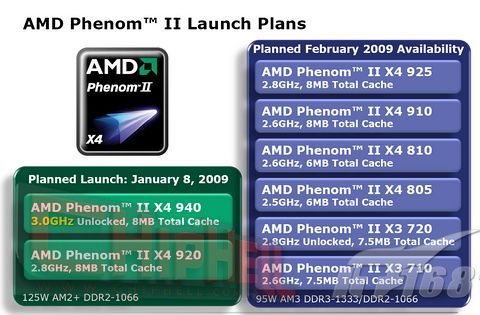
The motherboard supports AMD processors using the AM2+ socket, which might mean some of the upcoming AMD Phenom II processors could be supported, although that is not stated. While AMD may not quite offer the fastest processors around, they do offer excellent value. For example, the AMD Althon 64 X2 3800+ is currently rated as the best bang for the buck on Futuremark’s YouGamers.com. The motherboard also has support for HyperTransport 3.0 and includes two DIMM slots for up to 8 GB of DDR2-800/1066 memory.

The Zotac Geforce 8200-ITX WiFi motherboard has both VGA and DVI outputs, with HDMI available via a dongle. It also includes six external USB ports, gigabit Ethernet, PS/2 ports, four SATA 3.0 ports, 5.1-channel HD audio and built-in 802.11g WiFi. According to the product images, there appears to be no chipset fan, which should help keep the system noise down.

Pricing for the new Zotac Geforce 8200-ITX WiFi motherboard has yet to be revealed, but the following chart of comparable motherboards may help provide an idea of pricing. Going with a micro-ATX motherboard that includes a x16 PCIe slot may be the better choice for gamers, but for a media center PC, the Zotac Geforce 8200-ITX WiFi seems like a great choice.


author by Steve Seguin
Source: Tom's Hardware

Monday, December 1, 2008

Intel's Core i7: Blazing Fast, But Crippled O/C : Eight Virtual Cores Through Hyper-Threading part 2


Socket 1366

As a result of the integration of the memory controller directly into the CPU, Intel’s Core i7 now also sports data links to the memory modules. Other links have been affected by Intel’s transition from a front side bus interface to the QuickPath Interconnect solution. Intel has increased the number of pin connections from 775 to 1366, necessitating a new socket aptly named LGA1366. The mounting mechanism continues to use the same design, though. A frame covers the CPU and presses it into the socket, locking it in place with a small lever. This design is larger than the Socket 775 version, and obviously has the pins in a different arrangement.

However, the new Socket 1366 also comes with one disadvantage: the spacing between the mounting holes for the coolers has increased, meaning you’ll need a larger cooler and a new mounting clip or retention module when you make the switch. As a result, no Core 2 CPU is compatible with any Core i7 boards and vice versa. On the plus side, a cooler is included with the boxed version of the processors.